


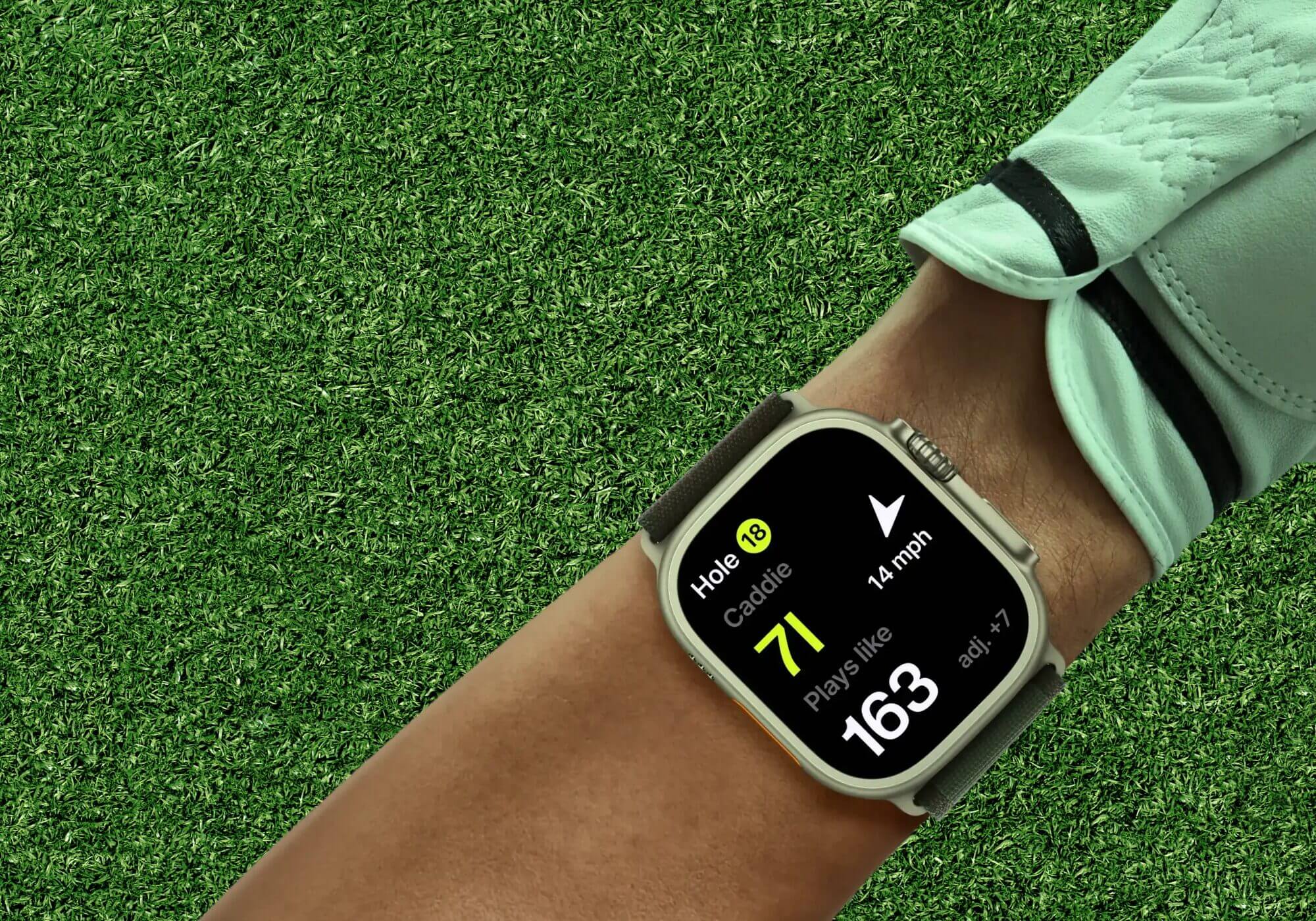
Many cool gadgets in the world of golf equipment don’t always fit well in Most Wanted Tests or Buyer’s Guides. You still want to know how it works. In our We Tried it series, we put the equipment to the test and let you know if it works as advertised.
What we tried: Tangent Golf. A GPS, photo tracking and Strokes Gained app for iPhone and Apple Watch.
Who tried it: Me! A 3 handicap with a full-time job, limited patience for apps that require a PhD to operate, and a history of using enough golf apps to know the difference between features that help and features that just look good on a screenshot.
I’ll be honest with you: Tangent Golf has more data than I will ever use.
I work full time at MyGolfSpy. I play when I can and I care about improving, but I’m not building a spreadsheet after every round. When I first dug into Tangent, my reaction was somewhere between impressed and exhausted. The depth is truly remarkable. It’s also a lot.
But here’s the thing: I kept using it. And some of it changed the way I played, for the better.
How does it compare to what I used
I got into this using 18Birdies and GolfLogix so I’m not a first time app golfer trying to figure out what Strokes Gained means. I know my way around a GPS app. This context matters because Tangent is an entirely different product category.
GolfLogix does GPS well. Clean, reliable, nothing fancy. 18Birdies gives you more—course maps, club tracking, some stats—but it never felt like it was doing anything with all that data. Tangent is what happens when someone builds an app specifically around the question, “What does this data really mean for your game?”
The Apple Watch integration is the best I’ve used on either of these platforms. It’s not an afterthought. The watch handles ranges, score entry, swing detection and data placement without constantly pushing you to your phone.
Getting into a rhythm – This takes a few rounds
I’m not going to sugarcoat this part. There is a growth period.
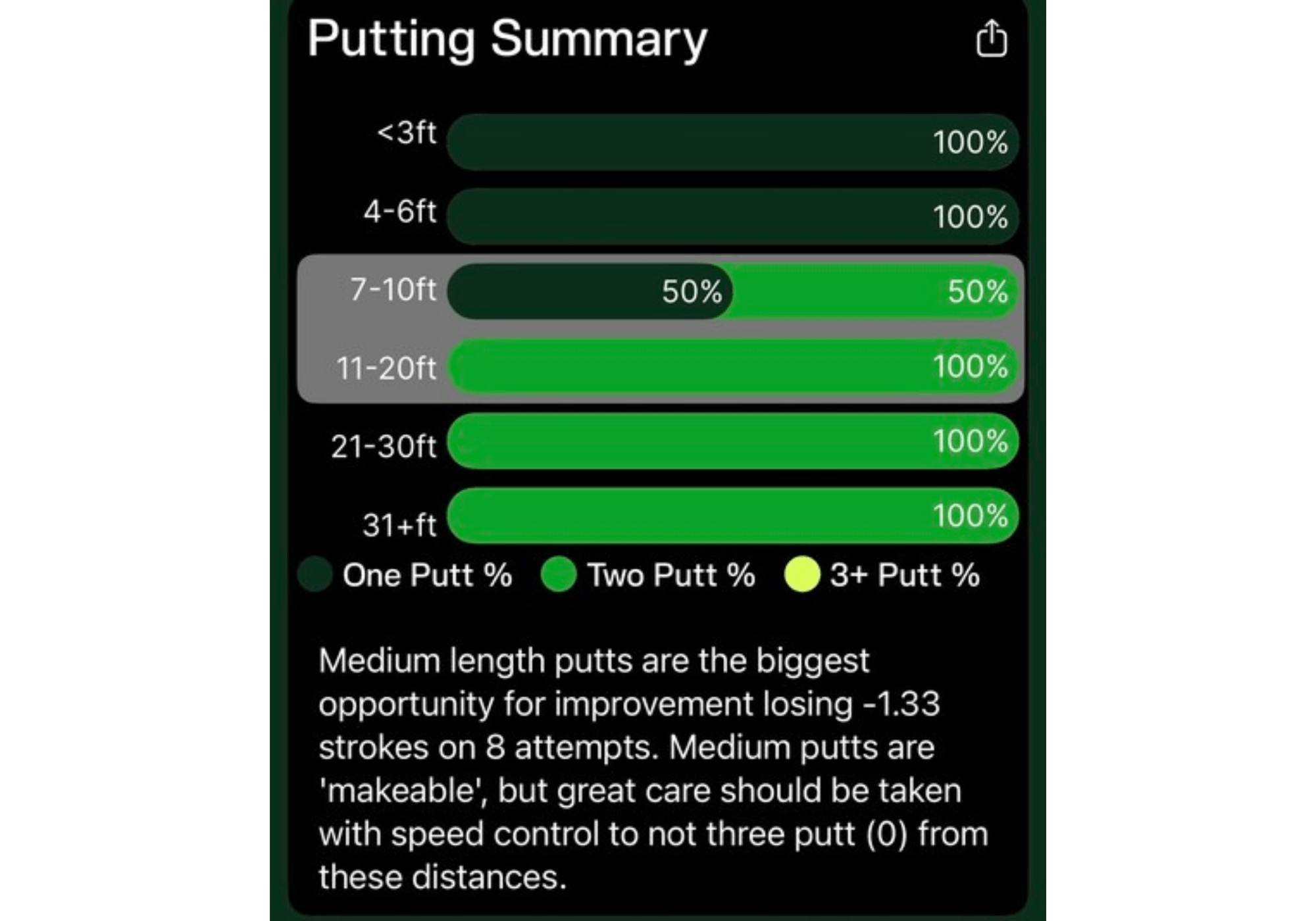
The two things that took the most adaptation were verifying club selection after each shot and recording shot details. Tangent automatically detects your swing, which is impressive, but it doesn’t know which club you used. You must confirm this after each hole. Same with putts: if you want your Strokes Gained data to mean anything, you need to slow down your putt distances and notice where the misses went.
Neither of these is a big ask. But it is a new habit. Building it takes a handful of rounds. After maybe four or five outings, it stopped feeling like homework and started to feel like just part of the routine. The watch makes both entries quickly. I found it easy to walk to the other team, even while having a conversation with my playing partners.
If you’re coming from a low-maintenance app and expect to slide through a round, you’ll feel the friction early. Give it a few weeks before you judge it. Once I found the rhythm, switching back to other apps made me feel like I was missing some key data points.
Caddy Trait: I was skeptical, then I wasn’t
Here’s where I’ll give Tangent real credit: Smart Caddy is actually very useful and I didn’t expect that.
As a 3 handicap, I don’t necessarily need an app to tell me how to play a hole, especially on my home course. I know my distances and my gut serves me well for course management. But the Caddy feature gained its hold, especially in those between-the-club situations when I’m sitting at 180 yards with a slight headwind and can’t really commit to the 7-iron or 6-iron.
Tangent knows my numbers. I know I tend to keep my approaches short. It affects wind and altitude. And he showed me the adjusted distance and just said: hit 6. That determination was worth something. The mental game of golf is real and standing over a club in the middle with doubts in your head is how to make a bogey or worse. Having the app sort out the argument in my head—and being right often enough to trust it—was legitimately helpful.
I also found it useful on courses I hadn’t played. “Explore” mode lets you walk through a hole-by-hole strategy before heading out, and seeing target recommendations with my actual distribution data overlaid made me play smarter on unfamiliar layouts.
Post-Round Analysis: Comprehensive
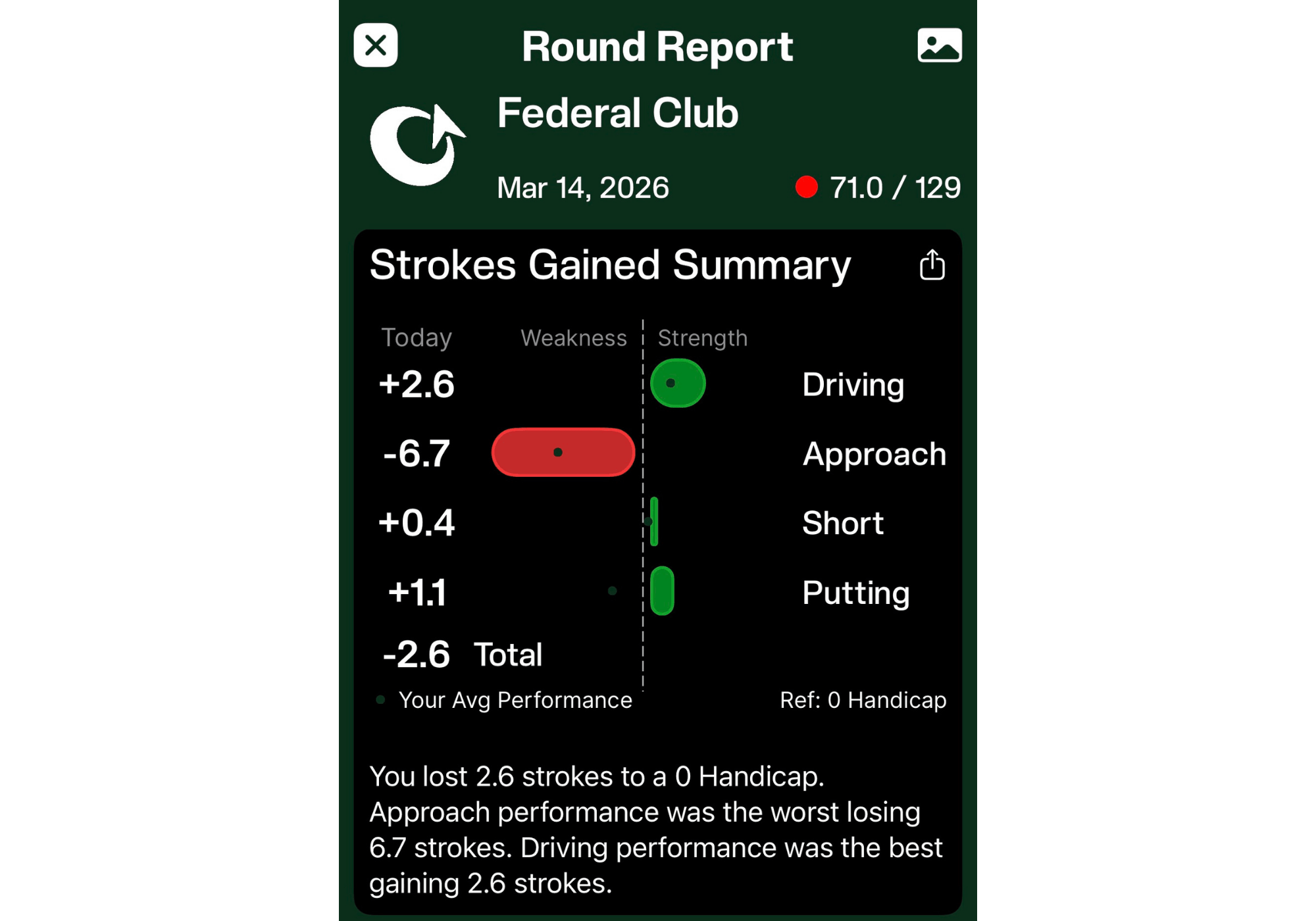
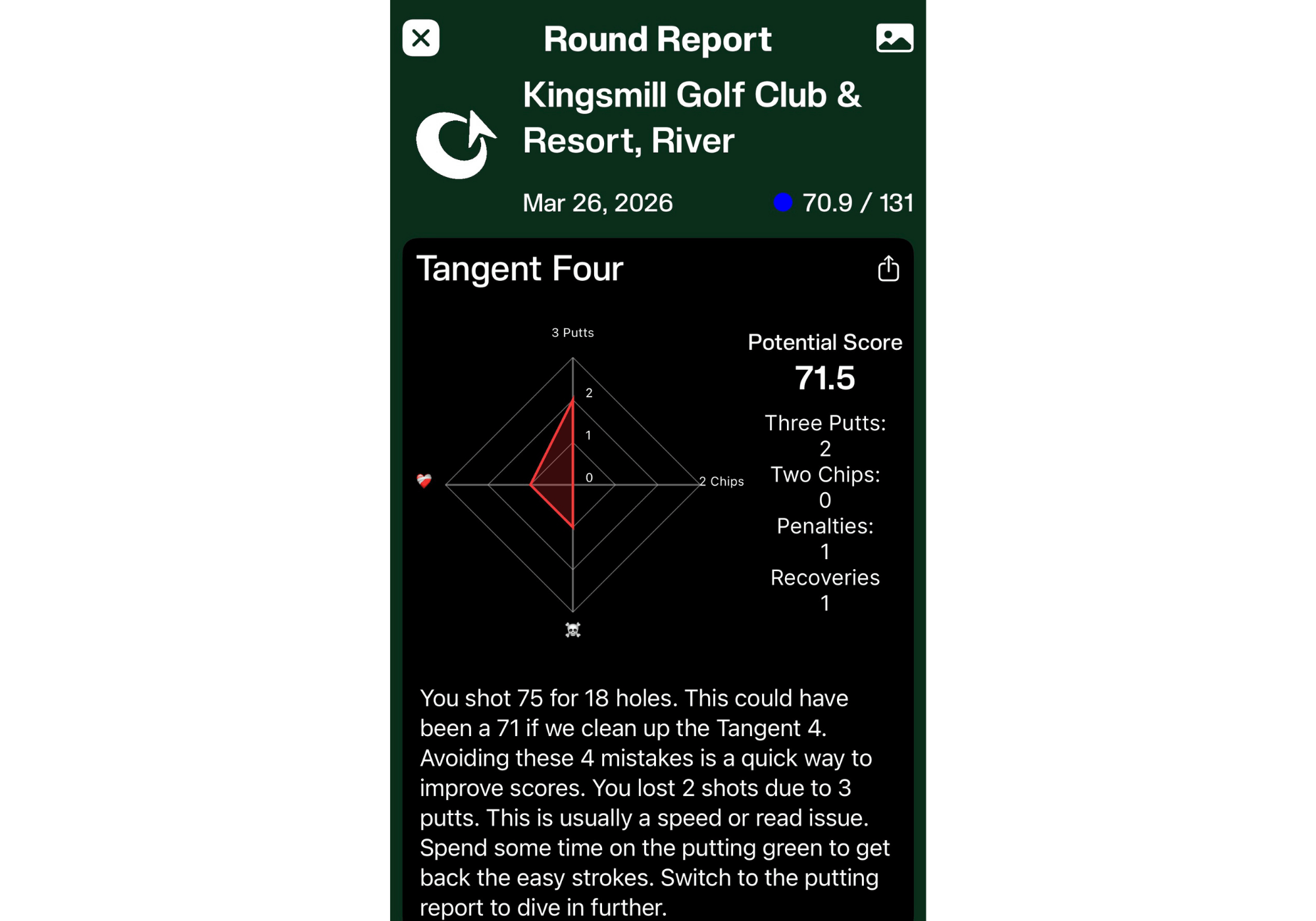
When you finish a round, the Round Ratio is where the Tangent really shows its cards: Strokes gained broken down by driving, approach, short game, putting. Subcategories within each. A spider chart called “Tangent Four” that shows your biggest problem areas: three shots, two-chip sequences, rebound shots, penalties.
It’s excellent. It’s also more than I can absorb in a single sitting after a round when I just want to grab a beer and decompress.
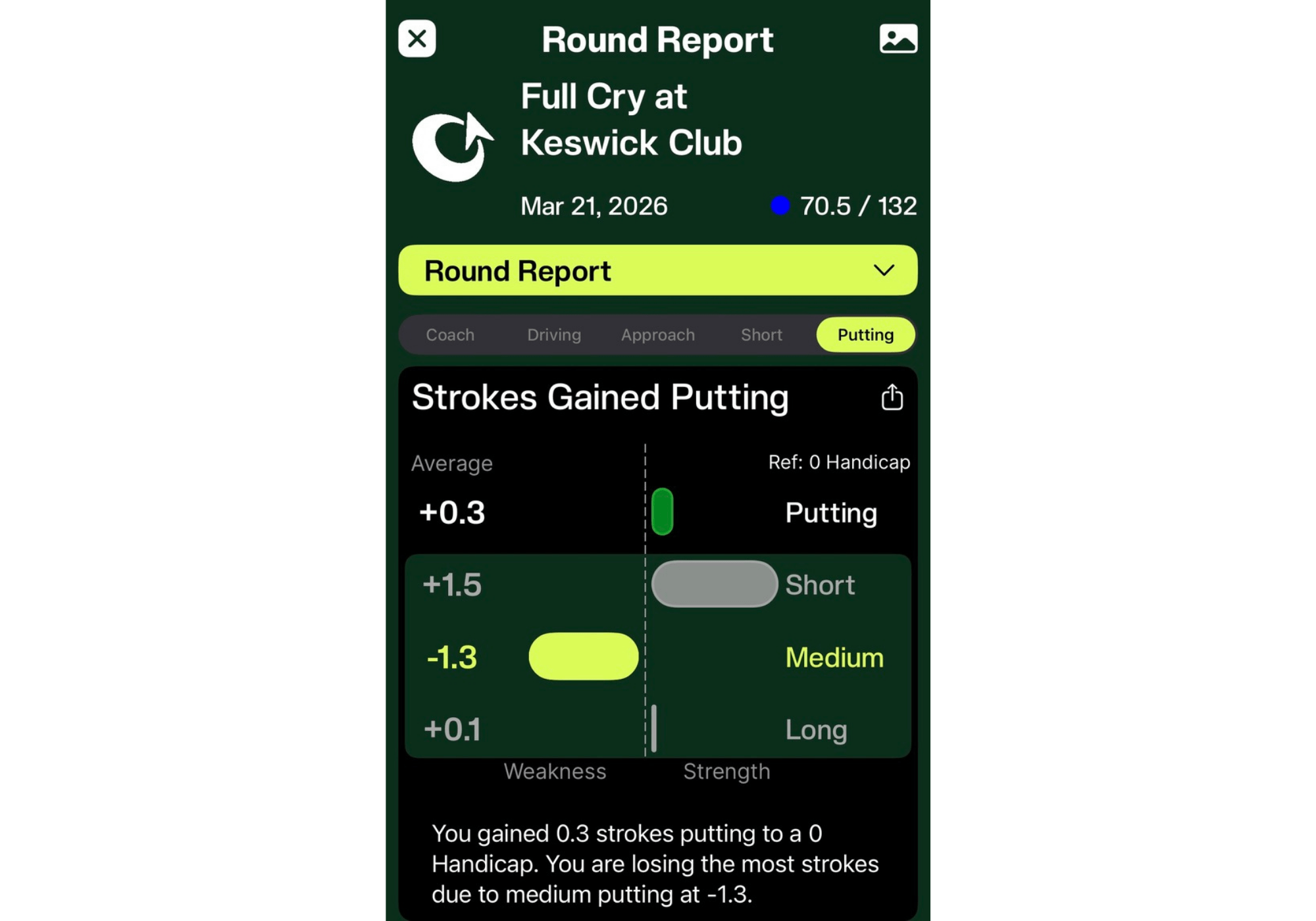
I have learned to focus. The top level Strokes Gained roundup is where I spend most of my time. This single view tells me where I actually bled shots, which is usually different than what I remember complaining about on the course. If I want to go deeper, I can. But I stopped trying to review every sub-metric after every round and just picked one or two things to pay attention to. This approach works well.
Green map: Needs work
This is my biggest complaint.
The tangent includes the green topography with directional arrows indicating the fault. In theory, this is great. In practice, it is difficult to use. The hands are dim and hard to read at a glance, especially on a bright day when you’re squinting at the watch face. But the bigger issue is that green is always forward oriented; it does not rotate to match the direction you are approaching from.
If you’re putting from the back of the green and the ball image is locked in a front-to-green orientation, you have to mentally re-map which way is “fair” on the screen versus where you’re standing. This defeats the purpose of speed reading. 18Birdies handles this better. The green map rotates to your position, so left is left and right is right.
The green Tangent map is functional. But it’s not good enough. This is a fixable problem and hopefully will be addressed.
Shot Tracking: Strong once you learn
Sensorless shake detection works better than I expected. He misses shots from time to time and penalty situations sometimes need cleaning up after the round. But this impact for me has been minimal. For a clean round of golf and no adjustments to caddy recommendations, it handles tracking without requiring you to manually record every shot. This is the promise and it is mostly fulfilled.
Battery life on the Apple Watch has not been an issue. I finished the rounds comfortably without worrying about running dry on the back nine.
The post-round editing interface on the phone is good for minor tweaks. If you have a chaotic hole with a drop and a re-putt, it takes a bit more effort to sort it out. Nothing that breaks the deal; just know it exists.
decision
In my opinion, Tangent Golf is the most complete game tracker I’ve used on an Apple Watch. The level of data and knowledge available also makes it more demanding than other applications. These two things are connected.
of The analysis of the strokes gained is really useful and deeper than anything 18Birdies provides. The Smart Caddy is legitimately useful, especially when you’re split between clubs. Shot tracking works without sensors which is the right approach. And after a few rounds of habit-forming, data entry stops feeling like a chore.
If they can fix the green maps, I seriously doubt I’d ever need another option to track my rounds. For someone like me who wants to move beyond gut feeling and actually understand where shots are lost and won, Tangent delivers.
You just have to decide how much of it you want to use. For most people, the answer is probably less than what Tangent offers, but that’s not a criticism. It’s a compliment.

